
January 19, 2018
Inadvertent Driver Air Bag Deployment
If the driver air bag inadvertently deploys, it can increase the risk of injury and a crash.
NHTSA Campaign Number: 18V065
Manufacturer Aston Martin The Americas
Components AIR BAGS
Potential Number of Units Affected 1,027
Summary
Aston Martin The Americas (Aston Martin) is recalling certain 2017-2018 DB11 V12 Coupe and DB11 V8 Coupe vehicles. The driver’s frontal air bag may unexpectedly deploy due to insufficient grounding of the steering components if an electrostatic discharge occurs and the air bag clockspring is broken.
Remedy
Aston Martin will notify owners, and dealers will add sufficient grounding to the steering components, free of charge. The recall is expected to begin March 2018. Owners may contact Aston Martin customer service at 1-888-923-9988.
Notes
Owners may also contact the National Highway Traffic Safety Administration Vehicle Safety Hotline at 1-888-327-4236 (TTY 1-800-424-9153), or go to www.safercar.gov.
Check if your Aston Martin has a Recall
SAFETY RECALL ACTION
| Reference number: | RA-01-1048 | Issued: 24 January, 2018 | |
| Subject: | Install Steering Column Grounds | ||
| Model(s): | DB11 | ||
| VIN range: | See attached VIN list | ||
| Applicable to: | All Dealers | ||
| Distribute to: | After Sales Manager
Executive Manager Service Manager Sales Manager | Warranty Staff
Technician(s) Parts Staff |
Attached Documents:
1. Appendix A – Table that Shows the Quantities of Affected Vehicles
Reason for this Safety Recall Action NHTSA ID: 18V-065.
Aston Martin has decided that a defect which relates to motor vehicle safety exists on DB11 models manufactured between June 2016 and November 2017.
On certain DB11 vehicles an electrostatic discharge (ESD), when combined with a damaged steering column control module clock spring and an insufficient grounding of the steering column upper, may lead to an inadvertent deployment of the driver airbag, which can increase the risk of injury and a crash. This Safety Recall Action gives instructions on how to install a contact bridge and a contact spring to the steering column. These components will remove the static charge from the steering wheel.
To correct this problem you must install two grounding components to the steering column.
The full list of VINs for the affected vehicles is on the Dealer Communication System (DCS) portal as an attachment to this Safety Recall Action document.
PLEASE DO A CHECK OF ALL VEHICLES THAT ARE IN THE AFFECTED VIN LIST
Legal Requirements
The National Traffic and Motor Vehicle Safety Act, as amended, provides that each vehicle which is subject to a recall campaign of this type must be adequately repaired within a reasonable time after the owner has tendered it for repair. Failure to repair within sixty (60) days after tender of a vehicle is prima facie evidence of failure to repair within a reasonable time.
If the condition is not adequately repaired within a reasonable time, the owner may be entitled to an identical or reasonable equivalent vehicle at no charge, or to a refund of the purchase price less a reasonable allowance for depreciation.
To avoid having to provide these difficult solutions, every effort must be made to promptly schedule an appointment with each owner and to repair their vehicle as soon as possible. As you will see in reading the attached copies of the letters that are being sent to Owners, the Owners are being instructed to contact Aston Martin Customer Service if their Dealer does not correct the condition within three (3) days of the mutually agreed upon service date. If the condition is not corrected within a reasonable time, they are instructed on how to contact the National Highway Traffic Safety Administration.
24 January, 2018
IMPORTANT: We remind you that it can be a violation of Section 30120(i) of the Federal Motor Vehicle Safety Act required under this notice if a Dealer sells or leases a vehicle that is covered by this notice without first completing the repair.
Communications
We will write to every owner directly to tell them about this Safety Recall Action. The customer letter and the “Change of Keeper or Address” form will be attached to this Safety Recall Action on DCS.
When the Owner calls to make an appointment, briefly describe the repair which will be done to the Owner’s vehicle and fully explain the reason for this work. Tell the owner that the repair will be done at no cost to them.
Service Reception Desk – Checks you must do before you book the vehicle in.
When you make a reservation for a Customer that you confirm the name and contact details are correct in Aston Martin’s records. To do this, please do the steps that follow:
- Enter the vehicle’s 6-digit chassis number into DCS (amdealers.com) and click “Validate” (refer to Figure 1).
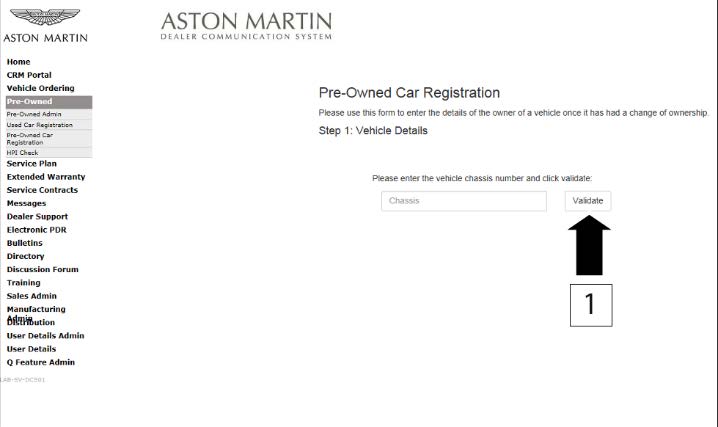
Figure 1
- Make sure that the vehicle details are correct. If the current owner is correct, no action is necessary.
- Make sure that the Customer name is correct. If the data is correct, then no action is necessary.
- To update the Customer details, use the search feature to find the customer in your Synergy database (refer to Figure 2).
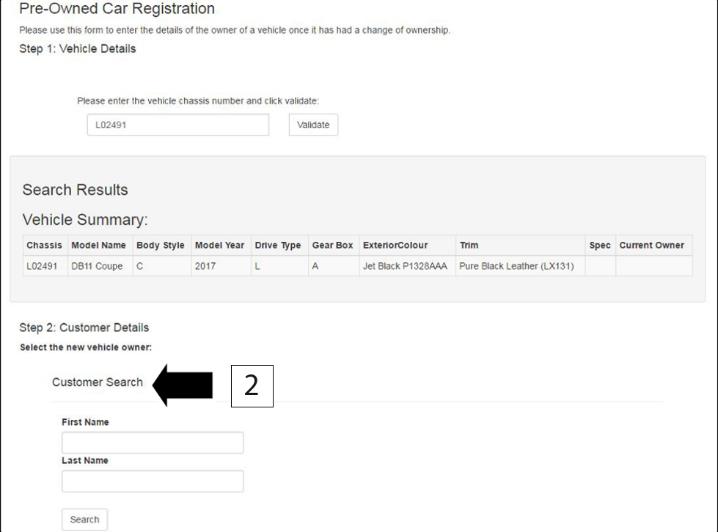
Figure 2
Note: The Customer record and updated details must have been entered into Synergy before you try to transfer the ownership in DCS.
- If the correct Customer shows, click “confirm”.
- If the correct Customer details do not show, click “add new”.
Before you start work
Log on to the Online Dealer Warranty (ODW) system. Do the steps that follow:
- Select the Warranty Live screen (Outstanding Campaigns Status).
- Download the VIN list from DCS and do a check of the VINs in your control.
- Find out if there are other open Service Actions (SAs) or Recall Actions (RAs) for the vehicles in the list.
- List the SAs and RAs and plan the work so that the Owner only needs to come to your Dealership once.
Note: The ODW system operates in real-time. Thus, the online condition shows only the newest Dealer Warranty Claim submissions.
Workshop Procedure
This Workshop Procedure has two parts: [where applicable]
- Part A– Examine steering column
- Part B– Install steering column grounds
Part A – Examine steering column
Note: Part A of the procedure that follows is for vehicles from L02866 thru L03917 only.
- Move the hush panel to get access to the screw that attaches the lower duct to the instrument panel (IP) (refer to Figure 3).
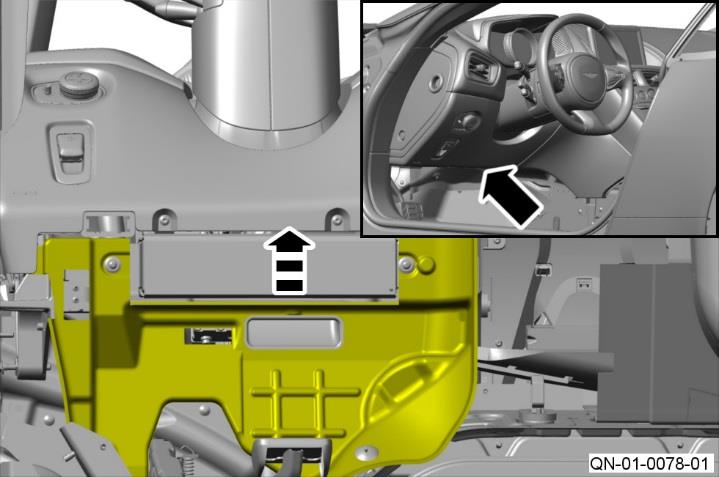
Figure 3
- Remove the screw that attaches the lower duct to the IP (refer to Figure 4).
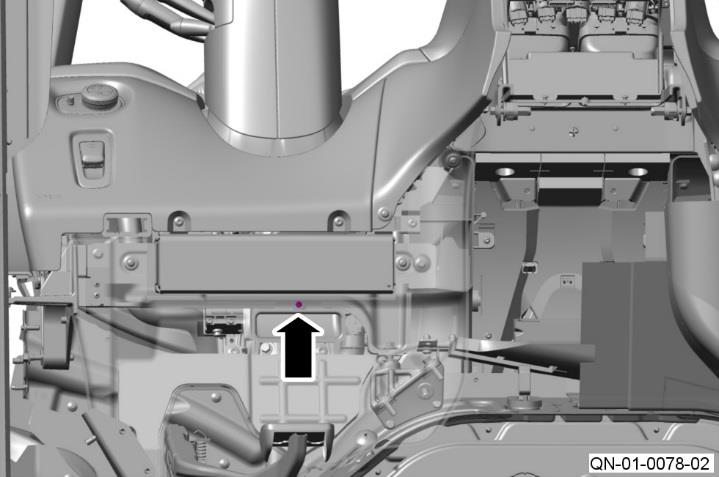
Figure 4
- Move the vent duct to get access to the steering column (refer to Figure 5).
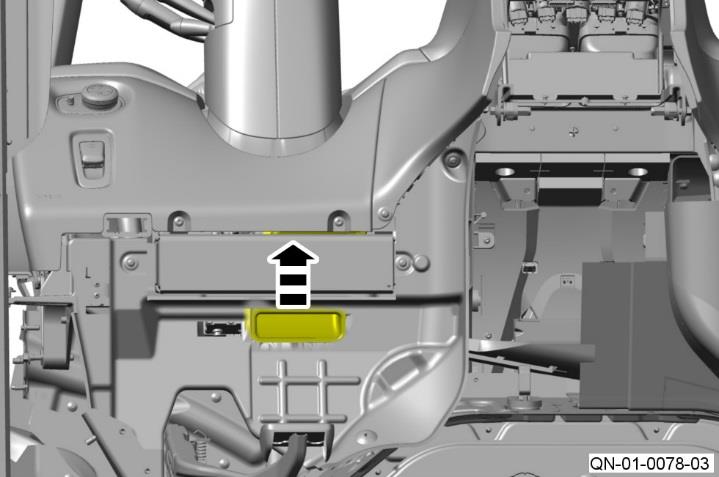
Figure 5
- Do a check of the component number on the label (refer to Figure 6).
- If the steering column is Q01 or Q02, photograph the label and do Part B after Part A is complete.
- If the steering column is Q03 or higher, no more work is necessary after Part A is complete.
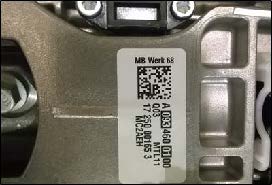
Figure 6
- Move the vent duct to its original position (refer to Figure 7).
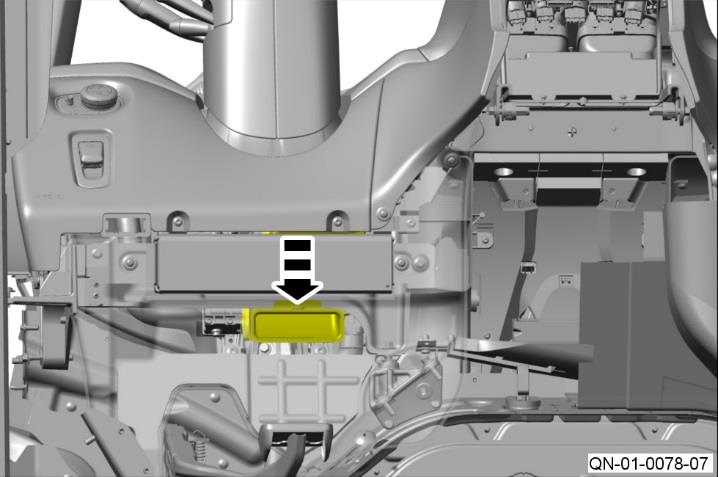
Figure 7
- Install and tighten the screw that attaches the lower duct to the IP (refer to Figure 8).
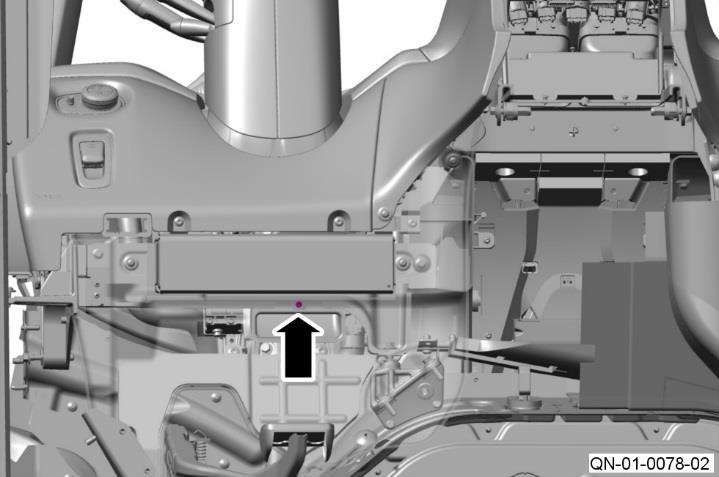
Figure 8
Part B – Install steering column grounds
Note: Part B of the procedure that follows is for all DB11 vehicles to L02865. Part B is also for DB11 vehicles from L02866 thru L03917 with Q01 or Q02 steering columns.
- Move the steering column to its lowest position.
- Remove the top and bottom shroud assembly for the steering column (refer to Workshop Manual Procedure 11.04.DB).
- Install the contact spring onto the circular casting on steering column (refer to Figure 9).
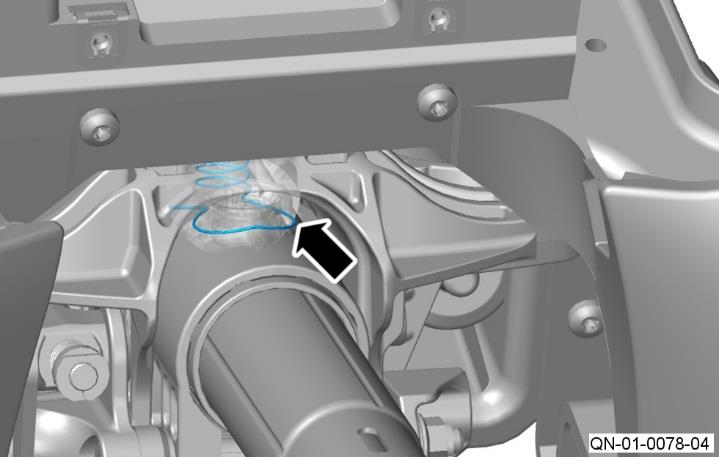
Figure 9
- The contact spring must be installed so that it touches the circular casting on the steering column (refer to Figure 10).
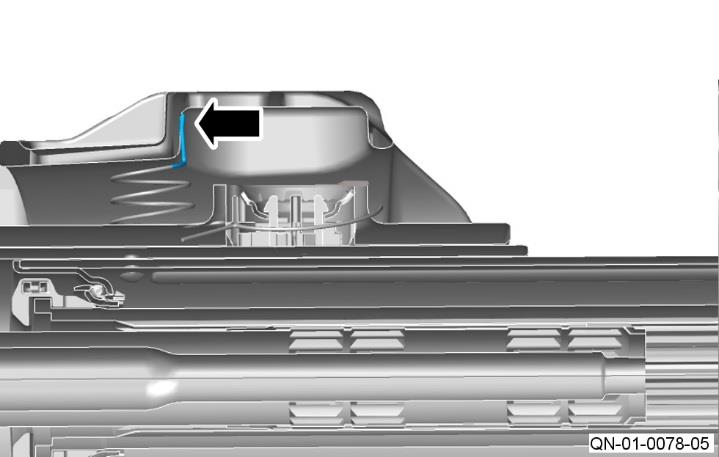
Figure 10
- Install the contact bridge onto the steering column (refer to Figure 11).
Note: The contact bridge must touch the outer steering column shaft.
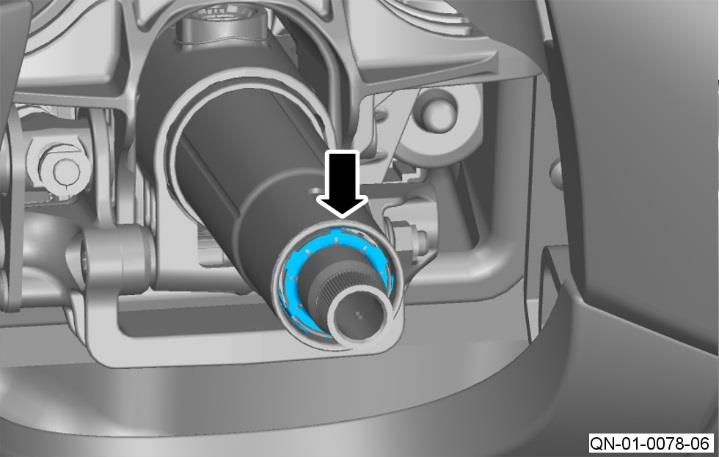
Figure 11
- Use a multi-meter to measure the resistance between the inner column (1) and the steering column casing (2) (refer to Figure 12).
- If the resistance is below 3 ohms go to step 7.
- If the resistance is above 3 ohms, make sure the components installed in steps 3 thru 5 are installed correctly.
Note: If the resistance is still above 3 ohms, contact AMTech.
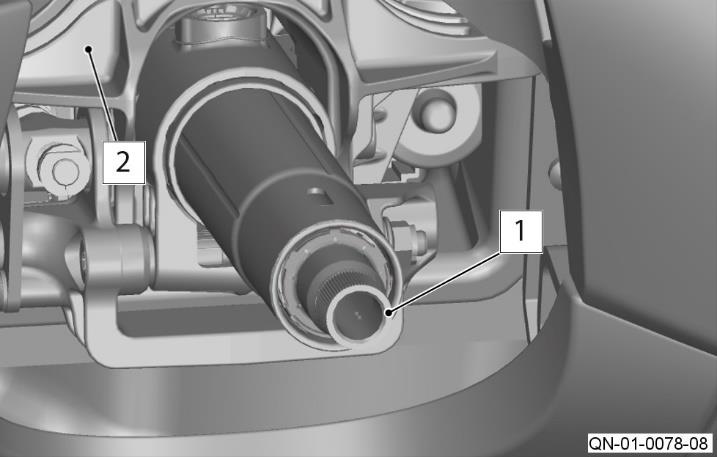
Figure 12
- Install the top and bottom shroud assembly for the steering column (refer to Workshop Manual Procedure 11.04.DB).
Warranty Data
Make sure that you submit your claim in less than 24 hours after the work is completed. The records of your claims are used in the reporting process for the Safety Recall Action that Aston Martin need to submit to the National Highway Traffic Safety Administration.
Note: If part B of the workshop procedure is necessary you must send the photograph of the label with your claim.
Save the photo in the format “Dealer Name – RA-01-1048 – ******” (6 Digit Chassis No)
Use the same format in the title of an email and send it to [email protected]
Please be aware that Warranty claims for installation of the contact spring and contact bridge parts may be charged back if a photograph is not received.
Procedure and Labour Time
Tier A – Examine Steering Column (Vehicles from L02866 thru L03917 only)
| Description | Labour Time |
| Examine Steering Column | 0.1 Hours |
| Install Steering Column Grounds | 1.8 hours |
Tier B – Install steering column grounds (Vehicles to L02865)
| Description | Labour Time |
| Install Steering Column Grounds | 1.8 hours |
Part Data
| Description | Part Number | Quantity |
| Contact Bridge | HY53-SE14A664-AA | 1 |
| Contact Spring | HY53-SE14A664-BA | 1 |
Please Note:
When you have completed this Safety Recall Action, make sure that you make an entry in Section A of the Vehicle Owner’s Guide to show that the procedure is completed.
Appendix A – Table that Shows the Quantities of Affected Vehicles in the US Market
Note: Please refer to the list on DCS for the vehicles in your region.
| Model | Registered & AMLNA Fleet (RA-01-1048) | Port & Dealer Not Registered (QN-01-1048) | Build Range (MM/YY) |
| DB11 V12 | 692 | 311 | 06/16 to 11/17 |
| DB11 V8 | 22 | 2 | 06/17 to 11/17 |
| TOTAL | 714 | 313 |
| If you have any questions related to this Safety Recall Action, please contact: Aston Martin Technical Services on: +44 (0) 1926 644720, email: [email protected], or contact your After Sales Manager.
The English version of this Safety Recall Action is written in Simplified Technical English to ASD-STE100™. |
March 22, 2018
IMPORTANT SAFETY RECALL NOTICE
NHTSA Recall 18V-065
This Notice applies to your vehicle:
Dear
Safety Recall Action RA-01-1048 – Install Steering Column Grounds
REASON FOR THIS RECALL ACTION
This notice is sent to you in accordance with the requirements of the National Traffic and Motor Vehicle Safety Act.
Aston Martin has decided that a defect which relates to motor vehicle safety exists on DB11 models manufactured between June 2016 and November 2017.
On certain DB11 vehicles an electrostatic discharge (ESD), when combined with a damaged steering column control module clock spring and an insufficient grounding of the steering column upper, may lead to an inadvertent deployment of the driver airbag, which can increase the risk of injury and a crash.
We would like to assure you that your vehicle remains safe to drive unless the Airbag / Supplemental Restraint System (SRS) light and warning message are shown in the instrument cluster.
If the Airbag/SRS light and warning message are shown in the instrument cluster, please do not drive the vehicle. Your nearest authorised Aston Martin Dealer or associated assistance provider can help you with support. Qualified Aston Martin Technicians will be able to diagnose your vehicle and determine if the fault is related to this recall.
WHAT WE WILL DO
We will install a contact bridge and a contact spring that will provide a suitable ground path for the steering column at no cost to you.
WHAT YOU SHOULD DO
Please contact your Aston Martin dealer as soon as possible to arrange a date for the repair. They will be able to fully explain why this Recall Action is necessary. Instructions for making this correction have been sent to your dealer. The labour time necessary to complete this service correction is a maximum of 2 hours. Please ask your dealer if you wish to know how much additional time will be needed to schedule and process your vehicle.
Your Aston Martin dealer is best equipped to obtain parts and provide the service to make sure that your vehicle is corrected as promptly as possible. If, however you take your vehicle to your dealer on the agreed service date and they do not remedy this condition on that date, or within three days, we recommend that you contact Aston Martin Customer Service by calling 1-866-278-6661.
If after contacting your dealer and Aston Martin Customer Services, you are still not able to have the safety defect remedied without charge and within a reasonable time, you may wish to write to the Administrator, National Highway Traffic Safety Administration, 1200 New Jersey Avenue, SE, Washington, DC 20590 or call 1-888-327-4236 (TTY: 1-800-424-9153) or go to https://www.safercar.gov.
If you have already had your vehicle repaired due to this problem before receipt of this notice, you may be entitled to reimbursement for any out of pocket costs. For further information, please contact Aston Martin Customer Service by calling 1-866-278-6661.
IF YOU NO LONGER OWN THE VEHICLE
If you have sold or traded your vehicle, please tell us by completing the enclosed Change of Keeper form and returning it to us.
Federal regulations require that any lessor receiving this recall notice must forward a copy of this notice to the lessee within ten days.
We are sorry to cause inconvenience with this Recall Action. However, this action has been taken in the interest of your safety and continued satisfaction with our products.
Yours sincerely
Phil Eaglesfield
General Manager
Client Services
Aston Martin Lagonda Limited
Chronology :
Please see Recall 17V-627.
October 2017 – Aston Martin was notified by the supplier of the steering column upper of a potential issue regarding that part. Aston Martin immediately launched an investigation into the issue and its potential effect on certain Aston Martin DB11 vehicles.
January 2018 – A Recall Committee convened on 15 January 2018 and determined that a voluntary Recall should be performed on all DB11 vehicles potentially affected with the defect.
There have been no reports of inadvertent airbag deployment, or injury caused by this defect on Aston Martin DB11 vehicles.
2 Affected Products
Vehicle
| MAKE | MODEL | YEAR |
| ASTON MARTIN | DB11 | 2017-2018 |
11 Associated Documents
Safety Bulletin
RCSB-18V065-0017.pdf 596.298KB
ISSUED Owner Notification Letter(Part 577)
RCONL-18V065-9800.pdf 52.404KB
Miscellaneous Document – Change of Ownership Form
RMISC-18V065-5948.pdf 67.184KB
Recall Quarterly Report #1, 2018-1
RCLQRT-18V065-8616.PDF 214.513KB
Recall Acknowledgement
RCAK-18V065-5345.pdf 245.741KB
Defect Notice 573 Report
RCLRPT-18V065-6086.PDF 218.555KB
Recall Quarterly Report #2, 2018-2
RCLQRT-18V065-5024.PDF 214.617KB
Recall Quarterly Report #4, 2018-4
RCLQRT-18V065-2100.PDF 211.438KB
Recall Quarterly Report #5, 2019-1
RCLQRT-18V065-9257.PDF 211.549KB
Recall Quarterly Report #3, 2018-3
RCLQRT-18V065-0311.PDF 211.325KB
Recall Quarterly Report #6, 2019-2
RCLQRT-18V065-5484.PDF 211.635KB
Latest Recalls Documents

- [Easy to Use—Work Out of the Box] + [FOXWELL 2026 New Version] FOXWELL NT604 Elite scan tool is the 2026 new version from FOXWELL, designed for car owners who want to figure out the cause of issues before fixing car problems by scanning common systems like ABS, SRS, engine, and transmission. The NT604 Elite obd2 scanner diagnostic tool comes with the latest software—no need to waste time downloading software first. Plug the scanner into the OBDII port with OBDII cable to start the diagnosis.
- [Affordable] + [Reliable Car Health Monitor] Will you be confused what happens when the warning light of ABS/SRS/transmission/check engine flashes? Instead of taking your cars to dealership, this FOXWELL scanner will help you do a thorough scanning and detection for your cars and pinpoint the root cause. Note:The device is a diagnostic tool, not a repair tool. To turn off a warning light, you must first physically repair the issue causing it. Only then can the scanner be used to clear the corresponding fault code.
- [5 in 1 Car Diagnostic Scanner] Compared with obd scanners (50-100), NT604 Elite code scanner not only includes their OBDII diagnosis but also serves as ABS/SRS scanner, transmission and check engine code reader. When it’s an odb2 scanner, you can use it to check if your car is ready for annual test through I/M readiness menu. In addition, live data stream, built-in DTC library, data play back and print, all these features are a big plus for it. Note: doesn't support maintenance functions like reset or relearn. For the SRS system, NT604 Elite can read and clear common fault codes not caused by a crash, but crash/collision data cannot be cleared.
- [Fantastic AUTOVIN] + [No extra software fee] Through the AUTOVIN menu, this NT604 Elite car scanner allows you to get your V-IN and vehicle info rapidly, no need to take time to find your V-IN and input one by one. What's more, the NT604 Elite ABS SRS scanner supports 60+ car brands from worldwide (America/Asia/Europe). You don’t need to pay extra software fee. AUTOVIN may not work on some older vehicles or certain vehicle brands. If AUTOVIN fails, please input the vin code manually or go to the Diagnostic Menu to select your vehicle model.
- [Solid protective case KO plastic carrying bag] + [Lifetime update] Almost all same price-level car scanner diagnostic tool only offers plastic bag to hold the scanner.However, NT604 Elite automotive scanner is equipped with solid protective case, preventing your obd2 scanner from damage. Then you don’t need to pay extra money to buy a solid toolbox.


- [Brand-New ArtiDiag500] We've got everything you're looking for! Forget basic OBD2 scanners; TOPDON's ArtiDiag500 car scanner offers more. The all-new ArtiDiag500 not only includes full OBD2 functions and 4-system diagnostics but also provides DIYers with 6 maintenance services. The brand-new, cost effective AD500 is back in full swing!
- [4-System Diagnostics] DIY enthusiasts, take notice! Will these 4-system diagnostics be the treasure you've been seeking? The ArtiDiag500 code reader offers in-depth testing for the engine, transmission, ABS, and SRS systems, reading fault codes and data streams. It also visualizes real-time data in chart form, simplifying complex data for storage and future playback, aiding DIY users in problem detection.
- [6 Reset Functions] Hey, hang tight for a moment. With these 6 reset functions, the ArtiDiag500 has got you covered. It offers throttle adaptation along with reset capabilities for Oil, SAS, TPMS, BMS, and EPB. Seamlessly aligning the throttle, battery, tires, and brake pads with your vehicle, it also adjusts the steering angle and turns off the oil light. Looking to restore your car to its original condition? Look no further than the ArtiDiag500.
- [Multiple Functions] The Smart AutoVIN of this TOPDON OBD2 scanner keeps track of your manual selections for vehicle make, model, and year and directs you to the suitable diagnostics. Max 4 Live Data streams integrated for much easier data processing. Diagnostic feedback online with this diagnostic tool to help you get tough repair operations well-completed. Real-time car battery voltage monitoring identifies probable vehicle defects.
- [Wide Vehicle Coverage] ArtiDiag500 currently supports 67+ car brands, 10,000+ models, covering most vehicles worldwide. Supports cutting-edge CAN FD protocols, making it compatible with modern vehicles including 2020+ GM & Chrysler. It supports FCA AutoAuth (official Secure Gateway access) to stay up to date with newer models from Chrysler, Jeep, Fiat, and others. Plus, it's fully compatible with Android 11 for smoother use.

- [All System Diagnostics, Professional-Level Scanner] - BLCKTEC 460T is the ultimate OBD2 diagnostic tool for home mechanics and professionals. It supports all 10 OBD2 modes, reads and clears Engine/Transmission/ABS/SRS codes, performs All-System Diagnostics, offers workshop reset tools, and provides real-time live data. It helps you pinpoint issues, assess your car's condition, and prepare for SMOG checks with ease. NOTE: Function availability depends on your vehicle. Before you buy, be sure to use the Compatibility Checker on BLCKTEC website or contact our customer support to verify that the features you need are supported for your vehicle’s specific year, make, and model.
- [12+ Most Popular Reset Functions] - BLCKTEC 460T OBD2 scanner offers 12+ dealer-level service functions, including Oil Maintenance Reset, ABS Bleeding, EPB Reset, SAS(Steering Angle Sensor) Recalibration, DPF(Diesel Particulate Filter) Reset, Throttle Body Relearn, Battery Reset/Initialization, TPMS Relearn, Transmission Reset, Fluid Change Reset, Maintenance Reset and more, enabling you to perform workshop services like a pro. NOTE: Function availability depends on your vehicle. Be sure to use the Compatibility Checker on BLCKTEC website to verify that the features you need are supported for your vehicle.
- [Real-Time OBD2 and OEM Live Data, Freeze Frame Data] - BLCKTEC 460T helps diagnose vehicle issues when warning lights like Check Engine Light or ABS/SRS Light appear. It offers detailed DTC info, ECU Freeze Frame Data, and real-time OBD2 and advanced OEM live data, including Engine, Transmission, ABS, SRS, and more, making it easy to diagnose and resolve vehicle problems. You can view, graph, record, replay, and overlay up to four live data streams in a single graph for better analysis.
- [AutoVIN, AutoReLink, AutoScan, 3X Faster] - Equipped with AutoVIN technology, 460T automatically retrieves the VIN to save you time. Its AutoScan and AutoReLink features scan all of the vehicle's ECUs and detect any fault codes immediately after you plug the scanner into the vehicle's OBD2 port - no button presses required. Additionally, it regathers DTC and I/M readiness information every 30 seconds, simplifying monitor tests. 460T's advanced technology makes it 3X faster than other products.
- [Get RepairSolutions2, the #1 Auto Repair App for Free] - When paired with RepairSolutions2(RS2) App, 460T becomes even more powerful. RS2's Verified Fix Database built by master technicians, provides the parts needed for the repair. Additionally, RS2 gives you access to OEM warranty info, maintenance schedules, TSB, and dealership recall info, making car care easier than ever. RS2 is free with no subscription fees and it stores your car scan reports in the cloud, allowing you to access, share, or print them anytime and anywhere.

- 【Full Systems Automotive Diagnostic】 More than checking engine, ABS and SRS, OBDMATE OM970 obd2 scanner performs comprehensive diagnostics on all electric modules. It quickly scans and clears fault codes, turns off warning lights, reads live data, and features Auto-VIN technology.
- 【Live Datastream&4-in-1 Graph】 Easily view live sensor data such as RPM, fuel trims, ATF temperature, wheel speed sensor, battery voltage and so on. OM970 scan tool also supports 4-in-1 trend graphing. Spend just 3 minutes to check – and you'll know exactly what's going wrong, helping you avoid hundreds in dealership diagnostic fees.
- 【One-Click I/M Readiness&Full OBD2 Functions】 Press F1 to get an intuitive corloured form about whether your vehicle's emissions-related systems are operating properly. Help you get smog-check ready quickly. OM970 obd2 diagnostic tool supports all essential OBD2 functions you need. Plus, it features battery voltage test and DLC 16-PIN test.
- 【Straightforward Menus with Easy Navigation】 All functions are easy to understand without obscure decriptions. 3.5" Large screen delivers clear readings while keeping one-hand operation. The car diagnostic tool comes with a silicone protective case and a hard-shell carrying case, ensuring long-lived durability and drop resistance.
- 【Budget-Friendly, No Subscriptions, Free Software Updates】 Plug and play: no bluetooth pairing, monthly fees, Wi-Fi connection, or any other troublesome initial settings. OM970 obd2 scanner works out of the box with the latest software. Lifetime free upgrade.
- DIAGNOSE ABS & SRS ISSUES - The 5310 OBD2 scanner diagnostic tool helps you quickly find and fix vehicle problems. Use the mobile scanner for car with the OBD2 Bluetooth application RepairSolutions2, available on App Store or Google Play, for real-time solutions. With this car scanner, access verified fixes, purchase exact repair parts, view maintenance schedules, and explore Innova’s wireless code readers & scan tools database. Vehicle coverage may vary. Please use Innova’s Coverage Checker to verify compatibility.
- PREMIUM OBD2 CODE READER WITH ENHANCED COVERAGE AND FUNCTIONALITY - This diagnostic scanner for all vehicles is ideal for home mechanics and professionals alike. Acting as a vehicle code reader, it reads and clears OBD trouble codes, provides car battery resets, hybrid diagnostics, trip cycle procedures, and total module scans. This car diagnostic scanner supports English, Spanish, and French, ensuring accessibility for a wide range of users.
- LIVE DATA FOR MORE ACCURATE DIAGNOSIS - With the Innova 5310 OBD2 scanner diagnostic tool, monitor your vehicle’s real-time data like RPM, speed, and oil temperature to identify issues. This car scanner diagnostic tool also includes battery and alternator tests to help determine if professional service is necessary. Its advanced features make it a must-have scan tool for accurate diagnostics and maintenance.
- EASY SELF-DIAGNOSIS OF EMISSION STATUS AND OTHER IMPORTANT INFORMATION - Stay ahead of smog checks with this vehicle fault code reader, which shows whether you’ll pass emissions tests. The 5310 acts as an essential car computer diagnostic reader, providing oil life levels and ABS diagnostics. As a car scanner diagnostic for all cars, it also supports SRS functionality, ensuring safety and compliance for all driving conditions.
- BUY WITH CONFIDENCE WITH USA DESIGNED AND SUPPORTED PRODUCTS - Designed in the USA, the Innova 5310 is a reliable car code reader and reset tool compatible with most 1996 and newer OBD2 vehicles, including cars, trucks, SUVs, and hybrids. Use this code reader for cars and trucks as your go-to scan tool and car diagnostic scanner for dependable performance. Not all features may work, so it's important to check vehicle compatibility with Innova's Coverage Checker before purchase.
SEOCONTENT-START
ASTON MARTIN CLIENT SERVICES 24 January, 2018 Page 1 of 8 S A F E T Y R E C A L L A C T ION Reference number: RA-01-1048 Issued: 24 January, 2018 Subject: Install Steering Column Grounds Model(s): DB11 VIN range: See attached VIN list Applicable to: All Dealers Distribute to: After Sales Manager Executive Manager Service Manager Sales Manager Warranty Staff Technician(s) Parts Staff Attached Documents: 1. Appendix A – Table that Shows the Quantities of Affected Vehicles Reason for this Safety Recall Action NHTSA ID: 18V-065. Aston Martin has decided that a defect which relates to motor vehicle safety exists on DB11 models manufactured between June 2016 and November 2017. On certain DB11 vehicles an electrostatic discharge (ESD), when combined with a damaged steering column control module clock spring and an insufficient grounding of the steering column upper, may lead to an inadvertent deployment of the driver airbag, which can increase the risk of injury and a crash. This Safety Recall Action gives instructions on how to install a contact bridge and a contact spring to the steering column. These components will remove the static charge from the steering wheel. To correct this problem you must install two grounding components to the steering column. The full list of VINs for the affected vehicles is on the Dealer Communication System (DCS) portal as an attachment to this Safety Recall Action document. PLEASE DO A CHECK OF ALL VEHICLES THAT ARE IN THE AFFECTED VIN LIST Legal Requirements The National Traffic and Motor Vehicle Safety Act, as amended, provides that each vehicle which is subject to a recall campaign of this type must be adequately repaired within a reasonable time after the owner has tendered it for repair. Failure to repair within sixty (60) days after tender of a vehicle is prima facie evidence of failure to repair within a reasonable time. If the condition is not adequately repaired within a reasonable time, the owner may be entitled to an identical or reasonable equivalent vehicle at no charge, or to a refund of the purchase price less a reasonable allowance for depreciation. To avoid having to provide these difficult solutions, every effort must be made to promptly schedule an appointment with each owner and to repair their vehicle as soon as possible. As you will see in reading the attached copies of the letters that are being sent to Owners, the Owners are being instructed to contact Aston Martin Customer Service if their Dealer does not correct the condition within three (3) days of the mutually agreed upon service date. If the condition is not corrected within a reasonable time, they are instructed on how to contact the National Highway Traffic Safety Administration. SAFETY RECALL ACTION RA-01-1048 24 January, 2018 Page 2 of 8 IMPORTANT: We remind you that it can be a violation of Section 30120(i) of the Federal Motor Vehicle Safety Act required under this notice if a Dealer sells or leases a vehicle that is covered by this notice without first completing the repair. Communications We will write to every owner directly to tell them about this Safety Recall Action. The customer letter and the “Change of Keeper or Address” form will be attached to this Safety Recall Action on DCS. When the Owner calls to make an appointment, briefly describe the repair which will be done to the Owner’s vehicle and fully explain the reason for this work. Tell the owner that the repair will be done at no cost to them. Service Reception Desk – Checks you must do before you book the vehicle in. When you make a reservation for a Customer that you confirm the name and contact details are correct in Aston Martin’s records. To do this, please do the steps that follow: 1. Enter the vehicle’s 6-digit chassis number into DCS (amdealers.com) and click “Validate” (refer to Figure 1). Figure 1 2. Make sure that the vehicle details are correct. If the current owner is correct, no action is necessary. 3. Make sure that the Customer name is correct. If the data is correct, then no action is necessary. 4. To update the Customer details, use the search feature to find the customer in your Synergy database (refer to Figure 2). Figure 2 Note: The Customer record and updated details must have been entered into Synergy before you try to transfer the ownership in DCS. 5. If the correct Customer shows, click “confirm”. 6. If the correct Customer details do not show, click “add new”. SAFETY RECALL ACTION RA-01-1048 24 January, 2018 Page 3 of 8 Before you start work Log on to the Online Dealer Warranty (ODW) system. Do the steps that follow: 7. Select the Warranty Live screen (Outstanding Campaigns Status). 8. Download the VIN list from DCS and do a check of the VINs in your control. 9. Find out if there are other open Service Actions (SAs) or Recall Actions (RAs) for the vehicles in the list. 10. List the SAs and RAs and plan the work so that the Owner only needs to come to your Dealership once. Note: The ODW system operates in real-time. Thus, the online condition shows only the newest Dealer Warranty Claim submissions. SAFETY RECALL ACTION RA-01-1048 24 January, 2018 Page 4 of 8 Workshop Procedure This Workshop Procedure has two parts: [where applicable] • Part A– Examine steering column • Part B– Install steering column grounds Part A – Examine steering column Note: Part A of the procedure that follows is for vehicles from L02866 thru L03917 only. 1. Move the hush panel to get access to the screw that attaches the lower duct to the instrument panel (IP) (refer to Figure 3). Figure 3 2. Remove the screw that attaches the lower duct to the IP (refer to Figure 4). Figure 4 3. Move the vent duct to get access to the steering column (refer to Figure 5). Figure 5 SAFETY RECALL ACTION RA-01-1048 24 January, 2018 Page 5 of 8 4. Do a check of the component number on the label (refer to Figure 6). • If the steering column is Q01 or Q02, photograph the label and do Part B after Part A is complete. • If the steering column is Q03 or higher, no more work is necessary after Part A is complete. Figure 6 5. Move the vent duct to its original position (refer to Figure 7). Figure 7 6. Install and tighten the screw that attaches the lower duct to the IP (refer to Figure 8). Figure 8 SAFETY RECALL ACTION RA-01-1048 24 January, 2018 Page 6 of 8 Part B – Install steering column grounds Note: Part B of the procedure that follows is for all DB11 vehicles to L02865. Part B is also for DB11 vehicles from L02866 thru L03917 with Q01 or Q02 steering columns. 1. Move the steering column to its lowest position. 2. Remove the top and bottom shroud assembly for the steering column (refer to Workshop Manual Procedure 11.04.DB). 3. Install the contact spring onto the circular casting on steering column (refer to Figure 9). Figure 9 4. The contact spring must be installed so that it touches the circular casting on the steering column (refer to Figure 10). Figure 10 5. Install the contact bridge onto the steering column (refer to Figure 11). Note: The contact bridge must touch the outer steering column shaft. Figure 11 SAFETY RECALL ACTION RA-01-1048 24 January, 2018 Page 7 of 8 6. Use a multi-meter to measure the resistance between the inner column (1) and the steering column casing (2) (refer to Figure 12). • If the resistance is below 3 ohms go to step 7. • If the resistance is above 3 ohms, make sure the components installed in steps 3 thru 5 are installed correctly. Note: If the resistance is still above 3 ohms, contact AMTech. Figure 12 7. Install the top and bottom shroud assembly for the steering column (refer to Workshop Manual Procedure 11.04.DB). Warranty Data Make sure that you submit your claim in less than 24 hours after the work is completed. The records of your claims are used in the reporting process for the Safety Recall Action that Aston Martin need to submit to the National Highway Traffic Safety Administration. Note: If part B of the workshop procedure is necessary you must send the photograph of the label with your claim. Save the photo in the format “Dealer Name – RA-01-1048 – ******” (6 Digit Chassis No) Use the same format in the title of an email and send it to [email protected] Please be aware that Warranty claims for installation of the contact spring and contact bridge parts may be charged back if a photograph is not received. Procedure and Labour Time Tier A – Examine Steering Column (Vehicles from L02866 thru L03917 only) Description Labour Time Examine Steering Column 0.1 Hours Install Steering Column Grounds 1.8 hours Tier B – Install steering column grounds (Vehicles to L02865) Description Labour Time Install Steering Column Grounds 1.8 hours Part Data Description Part Number Quantity Contact Bridge HY53-SE14A664-AA 1 Contact Spring HY53-SE14A664-BA 1 Please Note: When you have completed this Safety Recall Action, make sure that you make an entry in Section A of the Vehicle Owner’s Guide to show that the procedure is completed. SAFETY RECALL ACTION RA-01-1048 24 January, 2018 Page 8 of 8 Appendix A – Table that Shows the Quantities of Affected Vehicles in the US Market Note: Please refer to the list on DCS for the vehicles in your region. Model Registered & AMLNA Fleet (RA-01-1048) Port & Dealer Not Registered (QN-01-1048) Build Range (MM/YY) DB11 V12 692 311 06/16 to 11/17 DB11 V8 22 2 06/17 to 11/17 TOTAL 714 313 If you have any questions related to this Safety Recall Action, please contact: Aston Martin Technical Services on: +44 (0) 1926 644720, email: [email protected], or contact your After Sales Manager. The English version of this Safety Recall Action is written in Simplified Technical English to ASD-STE100™.
**************************************************************************************************************
IMPORTANT SAFETY RECALL NOTICE NHTSA Recall 18V-065 Safety Recall Action RA-01-1048 – Install Steering Column Grounds REASON FOR THIS RECALL ACTION This notice is sent to you in accordance with the requirements of the National Traffic and Motor Vehicle Safety Act. Aston Martin has decided that a defect which relates to motor vehicle safety exists on DB11 models manufactured between June 2016 and November 2017. On certain DB11 vehicles an electrostatic discharge (ESD), when combined with a damaged steering column control module clock spring and an insufficient grounding of the steering column upper, may lead to an inadvertent deployment of the driver airbag, which can increase the risk of injury and a crash. We would like to assure you that your vehicle remains safe to drive unless the Airbag / Supplemental Restraint System (SRS) light and warning message are shown in the instrument cluster. If the Airbag/SRS light and warning message are shown in the instrument cluster, please do not drive the vehicle. Your nearest authorised Aston Martin Dealer or associated assistance provider can help you with support. Qualified Aston Martin Technicians will be able to diagnose your vehicle and determine if the fault is related to this recall. WHAT WE WILL DO We will install a contact bridge and a contact spring that will provide a suitable ground path for the steering column at no cost to you. March 22, 2018 Dear This Notice applies to your vehicle: 1 WHAT YOU SHOULD DO Please contact your Aston Martin dealer as soon as possible to arrange a date for the repair. They will be able to fully explain why this Recall Action is necessary. Instructions for making this correction have been sent to your dealer. The labour time necessary to complete this service correction is a maximum of 2 hours. Please ask your dealer if you wish to know how much additional time will be needed to schedule and process your vehicle. Your Aston Martin dealer is best equipped to obtain parts and provide the service to make sure that your vehicle is corrected as promptly as possible. If, however you take your vehicle to your dealer on the agreed service date and they do not remedy this condition on that date, or within three days, we recommend that you contact Aston Martin Customer Service by calling 1-866-278-6661. If after contacting your dealer and Aston Martin Customer Services, you are still not able to have the safety defect remedied without charge and within a reasonable time, you may wish to write to the Administrator, National Highway Traffic Safety Administration, 1200 New Jersey Avenue, SE, Washington, DC 20590 or call 1-888-327-4236 (TTY: 1-800-424-9153) or go to http://www.safercar.gov. If you have already had your vehicle repaired due to this problem before receipt of this notice, you may be entitled to reimbursement for any out of pocket costs. For further information, please contact Aston Martin Customer Service by calling 1-866-278-6661. IF YOU NO LONGER OWN THE VEHICLE If you have sold or traded your vehicle, please tell us by completing the enclosed Change of Keeper form and returning it to us. Federal regulations require that any lessor receiving this recall notice must forward a copy of this notice to the lessee within ten days. We are sorry to cause inconvenience with this Recall Action. However, this action has been taken in the interest of your safety and continued satisfaction with our products. Yours sincerely Phil Eaglesfield General Manager Client Services Aston Martin Lagonda Limited
**************************************************************************************************************
OMB Control No.: 2127-0004 Part 573 Safety Recall Report 18V-065 The information contained in this report was submitted pursuant to 49 CFR §573 Manufacturer Name : Aston Martin The Americas Submission Date : JAN 19, 2018 NHTSA Recall No. : 18V-065 Manufacturer Recall No. : RA-01-1048 Manufacturer Information : Manufacturer Name : Aston Martin The Americas Address : Banbury Road Gaydon Warwick, United Kingdom 00 CV35 0DB Company phone : 999 Population : Number of potentially involved : 1,027 Estimated percentage with defect : 74 % Vehicle Information : Vehicle 1 : 2017-2018 Aston Martin DB11 V12 Coupe Vehicle Type : LOW VOLUME VEHICLES Body Style : 2-DOOR Power Train : GAS Descriptive Information : Aston Martin has determined that on certain DB11 vehicles an electrostatic discharge (ESD), when combined with a damaged steering column control module clock spring and an insufficient grounding of the steering column upper, may lead to an inadvertent deployment of the driver airbag.October 2017 – Aston Martin was notified by the supplier of the steering column upper of a potential issue regarding that part. Aston Martin immediately launched an investigation into the issue and its potential effect on certain Aston Martin DB11 vehicles. January 2018 – A Recall Committee convened on 15 January 2018 and determined that a voluntary Recall should be performed on all DB11 vehicles potentially affected with the defect. There have been no reports of inadvertent airbag deployment, or injury caused by this defect on Aston Martin DB11 vehicles. How remedy component differs from recalled component: Additional grounding added to the steering column on affected vehicles. Added components: Contact bridge, contact spring. Production Dates : JUN 09, 2016 – NOV 08, 2017 VIN Range 1 : Begin : SCFRMFAV2HGL00040 End : SCFRMFAV6JGL03917 ✔ Not sequential Vehicle 2 : 2017-2018 Aston Martin DB11 V8 Coupe Vehicle Type : LOW VOLUME VEHICLES Body Style : 2-DOOR Power Train : GAS Descriptive Information : Aston Martin has determined that on certain DB11 vehicles an electrostatic discharge (ESD), when combined with a damaged steering column control module clock spring and an insufficient grounding of the steering column upper, may lead to an Part 573 Safety Recall Report 18V-065 Page 2 The information contained in this report was submitted pursuant to 49 CFR §573 inadvertent deployment of the driver airbag. October 2017 – Aston Martin was notified by the supplier of the steering column upper of a potential issue regarding that part. Aston Martin immediately launched an investigation into the issue and its potential effect on certain Aston Martin DB11 vehicles. January 2018 – A Recall Committee convened on 15 January 2018 and determined that a voluntary Recall should be performed on all DB11 vehicles potentially affected with the defect. There have been no reports of inadvertent airbag deployment, or injury caused by this defect on Aston Martin DB11 vehicles. How remedy component differs from recalled component: Additional grounding added to the steering column on affected vehicles. Added components: Contact bridge, contact spring. Production Dates : JUN 08, 2017 – NOV 20, 2017 VIN Range 1 : Begin : SCFRMFAW1JGL02666 End : SCFRMFAWXJGL03895 ✔ Not sequential Description of Defect : Description of the Defect : Aston Martin has determined that on certain DB11 vehicles an electrostatic discharge (ESD), when combined with a damaged steering column control module clock spring and an insufficient grounding of the steering column upper, may lead to an inadvertent deployment of the driver airbag. FMVSS 1 : NR FMVSS 2 : NR Description of the Safety Risk : Inadvertent deployment of the driver’s airbag can cause injury to the driver and can increase the risk of a potential crash. Description of the Cause : An electrostatic discharge (ESD), when combined with a damaged steering column control module clock spring and an insufficient grounding of the steering column upper, may lead to an inadvertent deployment of the driver airbag. Identification of Any Warning that can Occur : A customer will be alerted to a potential fault by the airbag warning in the instrument cluster and an additional warning message. Supplier Identification : Component Manufacturer Name : Daimler AG Address : 137 Mercedesstrasse Stuttgart FOREIGN STATES 70327 Country : Germany Part 573 Safety Recall Report 18V-065 Page 3 The information contained in this report was submitted pursuant to 49 CFR §573 Chronology : Please see Recall 17V-627. October 2017 – Aston Martin was notified by the supplier of the steering column upper of a potential issue regarding that part. Aston Martin immediately launched an investigation into the issue and its potential effect on certain Aston Martin DB11 vehicles. January 2018 – A Recall Committee convened on 15 January 2018 and determined that a voluntary Recall should be performed on all DB11 vehicles potentially affected with the defect. There have been no reports of inadvertent airbag deployment, or injury caused by this defect on Aston Martin DB11 vehicles. Description of Remedy : Description of Remedy Program : Install a contact bridge and a contact spring that will provide a suitable ground path for the steering column. Owners will be notified to take their vehicle to an Aston Martin Dealer. The installation of the contact bridge and contact spring will be completed at no cost to the owner. How Remedy Component Differs from Recalled Component : Additional grounding added to the steering column on affected vehicles. Added components: Contact bridge, Part No HY53-SE14A664-BA Contact spring Part No HY53-SE14A664-AA Identify How/When Recall Condition was Corrected in Production : A change has been implemented into the steering column design to include an additional grounding path. Recall Schedule : Description of Recall Schedule : It is Aston Martin’s intention to notify all customers listed in table in 573.6(c) (2) above. Aston Martin will provide copies of the notification schedule, including mail dates for the owner letter, when available. Planned Dealer Notification Date : JAN 29, 2018 – JAN 29, 2018 Planned Owner Notification Date : MAR 01, 2018 – MAR 11, 2018 * NR – Not Reported
**************************************************************************************************************
SEOCONTENT-END
This product presentation was made with AAWP plugin.