
June 29, 2017 NHTSA CAMPAIGN NUMBER: 17V411000
Incorrectly Calibrated TPMS/FMVSS 138
If the driver is not warned that a tire is under-inflated, continued use may result in tire failure, increasing the risk of a crash.
NHTSA Campaign Number: 17V411
Manufacturer Aston Martin The Americas
Components TIRES
Potential Number of Units Affected 319
Summary
Aston Martin the Americas (Aston Martin) is recalling certain 2017 DB11 vehicles. The affected vehicles have a tire pressure monitoring system (TPMS) that may be incorrectly calibrated, resulting in the low tire pressure warning tell-tale not illuminating at the required minimum activation pressure. As such, these vehicles fail to comply with the requirements of Federal Motor Vehicle Safety Standard (FMVSS) number 138, “Tire Pressure Monitoring Systems.”
Remedy
Aston Martin will notify owners, and dealers will update the TPMS software, free of charge. The recall began July 18, 2017. Owners may contact Aston Martin customer service at 1-888-923-9988. Aston Martin’s number for this recall is RA-13-0025.
Notes
Owners may also contact the National Highway Traffic Safety Administration Vehicle Safety Hotline at 1-888-327-4236 (TTY 1-800-424-9153), or go to www.safercar.gov.
Check if your Aston Martin has a Recall
SAFETY RECALL ACTION
| Reference number: | RA-13-0025 | Issued: 06 July, 2017 | |
| Subject: | Incorrect Configuration for TPMS | ||
| Model(s): | DB11 | ||
| VIN range: | Refer to the separately published list of VINs | ||
| Applicable to: | All Dealers | ||
| Distribute to: | After Sales Manager
Executive Manager Service Manager Sales Manager | Warranty Staff
Technician(s) Parts Staff | |
Attached Documents:
- Appendix A – Table that Shows the Quantities of Affected Vehicles
- Copy of the Owner Notification letter for vehicles in RA-13-0025
- Copy of the Change of Keeper or Address form.
Reason for this Action (NHTSA Reference 17V411)
Aston Martin has determined that a defect which relates to motor vehicle safety exists on some DB11 vehicles that were manufactured from October 2016 and June 2017.
Some Aston Martin DB11 vehicles have incorrect coding installed in the Tire Pressure Monitoring System (TPMS). This means that if the pressures in the tires of the vehicle reduce because of a leak or puncture, the TPMS system will not give a warning to the driver at the necessary minimum tire pressure.
Note: The warning light in the instrument cluster will still come on, but at a lower pressure than the design specification.
Affected Models
This Action is applicable to DB11 built between November 2016 and June 2017.
To correct the problem
To correct this problem you must update the coding for the TPMS.
The full list of VINs for the affected vehicles is on the DCS portal as an attachment to this Safety Recall Action document.
PLEASE DO A CHECK OF ALL VEHICLES THAT ARE IN THE AFFECTED VIN LIST
Legal Requirements
The National Traffic and Motor Vehicle Safety Act, as amended, provides that each vehicle which is subject to a recall campaign of this type must be adequately repaired within a reasonable time after the owner has tendered it for repair. Failure to repair within sixty (60) days after tender of a vehicle is prima facie evidence of failure to repair within a reasonable time.
If the condition is not adequately repaired within a reasonable time, the owner may be entitled to an identical or reasonable equivalent vehicle at no charge, or to a refund of the purchase price less a reasonable allowance for depreciation.
To avoid having to provide these difficult solutions, every effort must be made to promptly schedule an appointment with each owner and to repair their vehicle as soon as possible. As you will see in reading the attached copies of the letters that are being sent to Owners, the Owners are being instructed to contact Aston Martin Customer Service if their Dealer does not correct the condition within three (3) days of the mutually agreed upon service date. If the condition is not corrected within a reasonable time, they are instructed on how to contact the National Highway Traffic Safety Administration.
IMPORTANT: We remind you that it can be a violation of Section 30120(i) of the Federal Motor Vehicle Safety Act required under this notice if a Dealer sells or leases a vehicle that is covered by this notice without first completing the repair.
Communications
We will write to every owner directly to tell them about this Safety Recall Action. A copy of the letter is attached at the end of this Recall Action for your information. There is also a copy of the “Change of Keeper’s Address or Ownership” form.
When the Owner calls to make an appointment, briefly describe the remedial work which will be done to the Owner’s vehicle and fully explain the reason for this work. Tell the owner that the repair will be done at no cost to them.
Service Reception Desk – Checks you must do before you book the vehicle in.
Please make sure that when you make a reservation for a Customer in the workshop of your Dealership that you also confirm the name and contact details of the customer are correct in Aston Martin’s records. To do this, please do the steps that follow:
- Enter the vehicle’s 6-digit chassis number into DCS(amdealers.com) and click “Validate” (refer to Figure 1).
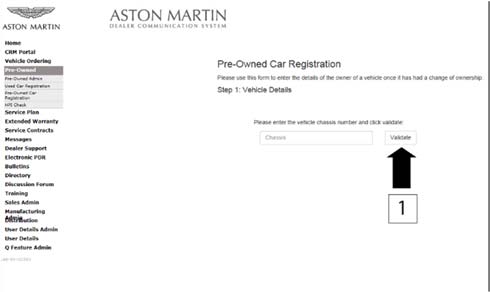
Figure 1
- Make sure that the vehicle details are correct. If the current owner is correct, no action is necessary.
- Make sure that the Customer name is correct. If the data is correct, then no action is necessary.
- To update the Customer details, use the search feature to find the customer in your Synergy database (refer to Figure 2).
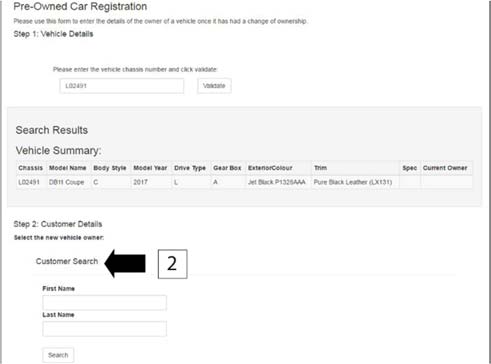
Figure 2
Note: The Customer record and updated details must have been entered into Synergy before you try to transfer the ownership in DCS.
- If the correct Customer shows, click “confirm”.
- If the correct Customer details do not show, click “add new”.
Before you start work
Log on to the Online Dealer Warranty (ODW) system. Do the steps that follow:
- Select the Warranty Live screen (Outstanding Campaigns Status).
- Download the attached VIN list from the DCS Portal and do a check of the VINs in your control.
- Find out if there are other open Service Actions (SAs) or Recall Actions (RAs) for the vehicles in the list.
- List the SAs and RAs and plan the work so that the Owner only needs to come to your Dealership once.
Note: The ODW system operates in real-time. Thus, the online condition shows only the newest Dealer Warranty Claim submissions.
Workshop Procedure
CAUTIONS: CONNECT THE AMDS 2.0 EQUIPMENT TO AN ELECTRICAL SUPPLY WHEN YOU DO THE PROCEDURE THAT FOLLOWS. IF THE LAPTOP BATTERY VOLTAGE DECREASES DURING THE UPDATE, THE UPDATE CAN FAIL AND CAN CAUSE DAMAGE TO THE MODULE.
YOU MUST CONNECT A BATTERY CHARGER TO THE VEHICLE BEFORE YOU DO DIAGNOSTIC PROCEDURES. IF THE VEHICLE BATTERY VOLTAGE DECREASES DURING THE PROCEDURE, THE UPDATE CAN FAIL AND CAN CAUSE DAMAGE TO THE MODULE.
Note: Make sure that the AMDS 2.0 software has updated to the latest version. You must have Version 1.0.0.44 or later. The AMDS 2.0 software will need a good Internet connection (minimum broadband speed of 2 Mbit/second) to make sure that the software is updated correctly.
A high output battery charger (minimum of 80 A) is necessary to meet the demand of the radiator cooling fan. The battery charger must also be compatible with Absorbent Glass Mat (AGM) type batteries.
WARNING: DO NOT WRITE CODING FILES TO MODULES UNLESS THE MODULE HAS BEEN REPLACED OR IF YOU ARE INSTRUCTED TO BY ASTON MARTIN CLIENT SERVICES.
- Connect the AMDS 2.0 equipment to the vehicle. Make sure that the laptop is connected to an electrical supply during the procedure.
- When AMDS 2.0 has recognised the vehicle’s VIN, navigate to the landing page of AMDS 2.0.
- Select “Read/Write” from the “ECU Coding” drop down list (refer to Figure 3)
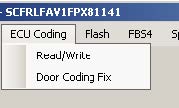
Figure 3
- Select “TPM” from the list of available modules and click “OK” (refer to Figure 4).
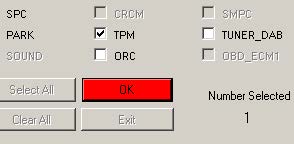
Figure 4
- Select “Get Coding From AML Server” (refer to Figure 5)
Note: The VIN for the connected vehicle will be shown.
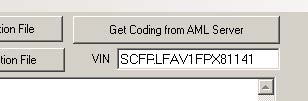
Figure 5
- AMDS will then connect to the AMDS server and download the coding data files for the selected module and VIN. If there are several coding data files, the newest will be opened.
- If the files are correctly downloaded, click “OK”. To write the coding data to the module, click “Save Coding to ECU(s)” (refer to Figure 6)
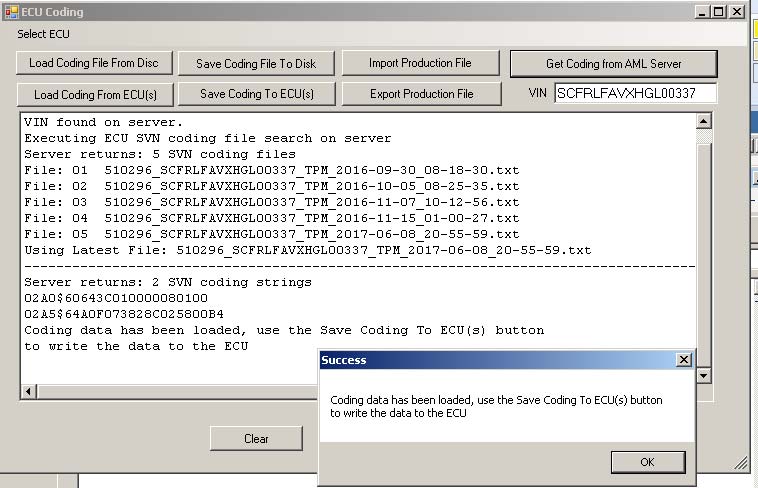
Figure 6
- When the procedure is completed, disconnect the AMDS 2.0 equipment and the battery charger.
Warranty Data
Make sure that you submit your claim in less than 24 hours after the work is completed. The records of your claims are used in the reporting process for the Recall Action that Aston Martin need to submit to the National Highway Traffic Safety Administration.
Procedure and Labor Time
| Description | Labour Time |
|---|---|
| TPM Module Coding Update | 0.2 hours |
Part Data
Not applicable.
Please Note:
When you have completed this Safety Recall Action, make sure that you make an entry in Section A of the Vehicle Owner’s Guide to show that the procedure is completed.
Note: Please refer to the VIN list on DCS for the vehicles in your region.
Appendix A – Table that Shows the Quantities of Affected Vehicles in the US Market
Note: Please refer to the list on DCS for the vehicles in your region.
| Model | Registered & AMLNA Fleet (RA-13-0025) | Port & Dealer Not Registered (QN-13-0065) | Build Range (MM/YY) |
| DB11 | 319 | 170 | 11/2016-06/2017 |
| TOTAL | 319 | 170 |
| If you have any questions related to this Recall Action, please contact: Aston Martin Technical Services on: +44 (0) 1926 644720, email: [email protected], or contact your After Sales Manager.
The English version of this Recall Action is written in Simplified Technical English to ASD-STE100™. |
Copy of the Owner Notification letter for vehicles in RA-13-0025
[Date DD Month, YYYY]
[Customer Name]
[Customer Address 1]
[Customer Address 2]
[Customer City/County]
[Customer Country]
IMPORTANT SAFETY RECALL NOTICE
NHTSA Recall 17V411
This notice applies to your vehicle: [INSERT VIN]
Dear [Customer]
Safety Recall Action RA-13-0025 – Incorrect Configuration of DB11 TPMS
This notice is sent to you in accordance with the requirements of the National Traffic and Motor Vehicle Safety Act.
Aston Martin has determined that a defect which relates to motor vehicle safety exists on a range of vehicles that were manufactured from November 2016 to June 2017.
A number of Aston Martin DB11 vehicles have incorrect coding installed in the Tire Pressure Monitoring System (TPMS).
This means that if the pressures in the tyres of the vehicle reduce because of a leak or puncture, the TPMS system will not give a warning to the driver at the required minimum tyre pressure.
The models affected are:
- DB11 Coupe.
WHAT WE WILL DO
We will update the coding for the Tire Pressure Monitor (TPM) module.
WHAT YOU SHOULD DO
Please contact your Aston Martin dealer as soon as possible to arrange a date for the repair. They will be able to fully explain why this Recall Action is necessary. Instructions for making this correction have been sent to your dealer. The labor time necessary to complete this service correction is a maximum of one hour. Please ask your dealer if you wish to know how much additional time will be needed to schedule and process your vehicle.
Your Aston Martin dealer is best equipped to obtain parts and provide the service to make sure that your vehicle is corrected as promptly as possible. If, however you take your vehicle to your dealer on the agreed service date and they do not remedy this condition on that date, or within three days, we recommend that you contact Aston Martin Customer Service by calling 1-888923-9988.
If after contacting your dealer and Aston Martin Customer Services, you are still not able to have the safety defect remedied without charge and within a reasonable time, you may wish to write to the Administrator, National Highway Traffic Safety Administration, 1200 New Jersey Avenue, SE, Washington, DC 20590 or call 1-888-327-4236 (TTY: 1-800-424-9153) or go to https://www.safercar.gov.
If you have already had your vehicle repaired due to this problem before receipt of this notice, you may be entitled to reimbursement for any out of pocket costs. For further information, please contact Aston Martin Customer Service by calling 1-888-923-9988.
IF YOU NO LONGER OWN THE VEHICLE
If you have sold or traded your vehicle, please tell us by completing the enclosed Change of Keeper form and returning it to us.
Federal regulations require that any lessor receiving this recall notice must forward a copy of this notice to the lessee within ten days.
Phil Eaglesfield
General Manager
Global After Sales Operations and Parts Operations
Aston Martin Lagonda Limited
Chronology :
In June 2017, a model year validation exercise was conducted which identified the incorrect Diagnostic Identification address coding. An investigation was launched by Aston Martin’s Technical Review Group and results were reported to the Critical Concerns Review Group on 22 June 2017. A Recall Committee convened on June 22, 2017 and determined there was a non-compliance.
1 Affected Product
Vehicle
| MAKE | MODEL | YEAR |
| ASTON MARTIN | DB11 | 2017 |
11 Associated Documents
Manufacturer Notices(to Dealers,etc)
Recall Acknowledgement
RCAK-17V411-7617.pdf 247.895KB
Non-Compliance 573 Report/FMVSS 138
RCLRPT-17V411-5136.PDF 216.229KB
Recall Quarterly Report #2, 2017-4
RCLQRT-17V411-8388.PDF 214.614KB
Manufacturer Notices(to Dealers,etc) – TSB – NUMBER SC147 (Rev 3, 7/14/2017) DATE June 2017
RCMN-17V411-1925.pdf 233.231KB
Recall Quarterly Report #1, 2017-3
RCLQRT-17V411-4348.PDF 214.511KB
Owner Notification Letter(Part 577)
RCONL-17V411-0135.pdf 224.684KB
Recall Quarterly Report #3, 2018-1
RCLQRT-17V411-8606.PDF 214.715KB
Recall Quarterly Report #4, 2018-2
RCLQRT-17V411-7044.PDF 214.808KB
Recall Quarterly Report #5, 2018-3
RCLQRT-17V411-9284.PDF 214.918KB
Recall Quarterly Report #6, 2018-4
RCLQRT-17V411-4102.PDF 211.631KB
Latest Recalls Documents
No products found.
SEOCONTENT-START
August 18, 2017 IMPORTANT SAFETY RECALL NOTICE NHTSA Recall 17V411 This notice applies to your vehicle: Dea Safety Recall Action RA-13-0025 – Incorrect Configuration of DB11 TPMS This notice is sent to you in accordance with the requirements of the National Traffic and Motor Vehicle Safety Act. Aston Martin has decided that certain 2017 OB11 vehicles that were manufactured from November 2016 to June 2017 fail to comply with Federal Motor Vehicle Sat ety Standard number 138, “Tire Pressure Monitoring System”. A number of vehicles have incorrect coding installed in the Tire Pressure Monitoring System (TPMS). This means that if the pressures in the tyres of the vehicle reduce because of a leak or puncture, the TPMS system will not give a warning to the driver at the required minimum tyre pressure, increasing the risk of a crash. The models affected are: • OB11 Coupe. WHAT WE WILL DO We will update the coding for the Tire Pressure Monitor (TPM) module free of charge. WHAT YOU SHOULD DO Please contact your Aston Martin dealer as soon as possible to arrange a date for the repair. They will be able to fully explain why this Recall Action is necessary. Instructions for making this correction have been sent to your dealer. The labor time necessary to complete this service correction is a maximum of one hour. Please ask your dealer if you wish to know how much additional time will be needed to schedule and process your vehicle. Your Aston Martin dealer is best equipped to obtain parts and provide the service to make sure that your vehicle is corrected as promptly as possible. If, however you take your vehicle to your dealer on the agreed service date and they do not remedy this condition on that date, or within three days, we recommend that you contact Aston Martin Customer Service by calling 1-888- 923-9988. If after contacting your dealer and Aston Martin Customer Services, you are still not able to have the safety defect remedied without charge and within a reasonable time, you may wish RA-13-0025 Customer Letter Fed Page 1 of 2 V25 1 to write to the Administrator, National Highway Traffic Safety Administration, 1200 New Jersey Avenue, SE, Washington, DC 20590 or call 1-888-327-4236 (TTY: 1-800-424-9153) or go to http://www.safercar.gov. If you have already had your vehicle repaired due to this problem before receipt of this notice, you may be entitled to reimbursement for any out of pocket costs. For further information, please contact Aston Martin Customer Service by calling 1-888-923-9988. IF YOU NO LONGER OWN THE VEHICLE If you have sold or traded your vehicle, please tell us by completing the enclosed Change of Keeper form and returning it to us. Federal regulations require that any lessor receiving this recall notice must forward a copy of this notice to the lessee within ten days. We are sorry to cause inconvenience with this Recall Action. However, this action has been taken in the interest of your safety and continued satisfaction with our products. Yours sincerely Phil Eaglesfield General Manager Global After Sales Operations and Parts Operations Aston Martin Lagonda Limited RA-13-0025 Customer Letter Fed Page 2 of 2
**************************************************************************************************************
ASTON MARTIN CLIENT SERVICES 06 July, 2017 Page 1 of 6 SAFETY RECALL ACTION Reference number: RA-13-0025 Issued: 06 July, 2017 Subject: Incorrect Configuration for TPMS Model(s): DB11 VIN range: Refer to the separately published list of VINs Applicable to: All Dealers Distribute to: After Sales Manager Executive Manager Service Manager Sales Manager Warranty Staff Technician(s) Parts Staff Attached Documents: 1. Appendix A – Table that Shows the Quantities of Affected Vehicles 2. Copy of the Owner Notification letter for vehicles in RA-13-0025 3. Copy of the Change of Keeper or Address form. Reason for this Action (NHTSA Reference 17V411) Aston Martin has determined that a defect which relates to motor vehicle safety exists on some DB11 vehicles that were manufactured from October 2016 and June 2017. Some Aston Martin DB11 vehicles have incorrect coding installed in the Tire Pressure Monitoring System (TPMS). This means that if the pressures in the tires of the vehicle reduce because of a leak or puncture, the TPMS system will not give a warning to the driver at the necessary minimum tire pressure. Note: The warning light in the instrument cluster will still come on, but at a lower pressure than the design specification. Affected Models This Action is applicable to DB11 built between November 2016 and June 2017. To correct the problem To correct this problem you must update the coding for the TPMS. The full list of VINs for the affected vehicles is on the DCS portal as an attachment to this Safety Recall Action document. PLEASE DO A CHECK OF ALL VEHICLES THAT ARE IN THE AFFECTED VIN LIST SAFETY RECALL ACTION RA-13-0025 06 July, 2017 Page 2 of 6 Legal Requirements The National Traffic and Motor Vehicle Safety Act, as amended, provides that each vehicle which is subject to a recall campaign of this type must be adequately repaired within a reasonable time after the owner has tendered it for repair. Failure to repair within sixty (60) days after tender of a vehicle is prima facie evidence of failure to repair within a reasonable time. If the condition is not adequately repaired within a reasonable time, the owner may be entitled to an identical or reasonable equivalent vehicle at no charge, or to a refund of the purchase price less a reasonable allowance for depreciation. To avoid having to provide these difficult solutions, every effort must be made to promptly schedule an appointment with each owner and to repair their vehicle as soon as possible. As you will see in reading the attached copies of the letters that are being sent to Owners, the Owners are being instructed to contact Aston Martin Customer Service if their Dealer does not correct the condition within three (3) days of the mutually agreed upon service date. If the condition is not corrected within a reasonable time, they are instructed on how to contact the National Highway Traffic Safety Administration. IMPORTANT: We remind you that it can be a violation of Section 30120(i) of the Federal Motor Vehicle Safety Act required under this notice if a Dealer sells or leases a vehicle that is covered by this notice without first completing the repair. Communications We will write to every owner directly to tell them about this Safety Recall Action. A copy of the letter is attached at the end of this Recall Action for your information. There is also a copy of the “Change of Keeper’s Address or Ownership” form. When the Owner calls to make an appointment, briefly describe the remedial work which will be done to the Owner’s vehicle and fully explain the reason for this work. Tell the owner that the repair will be done at no cost to them. Service Reception Desk – Checks you must do before you book the vehicle in. Please make sure that when you make a reservation for a Customer in the workshop of your Dealership that you also confirm the name and contact details of the customer are correct in Aston Martin’s records. To do this, please do the steps that follow: 1. Enter the vehicle’s 6-digit chassis number into DCS (amdealers.com) and click “Validate” (refer to Figure 1). Figure 1 2. Make sure that the vehicle details are correct. If the current owner is correct, no action is necessary. 3. Make sure that the Customer name is correct. If the data is correct, then no action is necessary. SAFETY RECALL ACTION RA-13-0025 06 July, 2017 Page 3 of 6 4. To update the Customer details, use the search feature to find the customer in your Synergy database (refer to Figure 2). Figure 2 Note: The Customer record and updated details must have been entered into Synergy before you try to transfer the ownership in DCS. 5. If the correct Customer shows, click “confirm”. 6. If the correct Customer details do not show, click “add new”. Before you start work Log on to the Online Dealer Warranty (ODW) system. Do the steps that follow: 1. Select the Warranty Live screen (Outstanding Campaigns Status). 2. Download the attached VIN list from the DCS Portal and do a check of the VINs in your control. 3. Find out if there are other open Service Actions (SAs) or Recall Actions (RAs) for the vehicles in the list. 4. List the SAs and RAs and plan the work so that the Owner only needs to come to your Dealership once. Note: The ODW system operates in real-time. Thus, the online condition shows only the newest Dealer Warranty Claim submissions. SAFETY RECALL ACTION RA-13-0025 06 July, 2017 Page 4 of 6 Workshop Procedure CAUTIONS: CONNECT THE AMDS 2.0 EQUIPMENT TO AN ELECTRICAL SUPPLY WHEN YOU DO THE PROCEDURE THAT FOLLOWS. IF THE LAPTOP BATTERY VOLTAGE DECREASES DURING THE UPDATE, THE UPDATE CAN FAIL AND CAN CAUSE DAMAGE TO THE MODULE. YOU MUST CONNECT A BATTERY CHARGER TO THE VEHICLE BEFORE YOU DO DIAGNOSTIC PROCEDURES. IF THE VEHICLE BATTERY VOLTAGE DECREASES DURING THE PROCEDURE, THE UPDATE CAN FAIL AND CAN CAUSE DAMAGE TO THE MODULE. Note: Make sure that the AMDS 2.0 software has updated to the latest version. You must have Version 1.0.0.44 or later. The AMDS 2.0 software will need a good Internet connection (minimum broadband speed of 2 Mbit/second) to make sure that the software is updated correctly. A high output battery charger (minimum of 80 A) is necessary to meet the demand of the radiator cooling fan. The battery charger must also be compatible with Absorbent Glass Mat (AGM) type batteries. WARNING: DO NOT WRITE CODING FILES TO MODULES UNLESS THE MODULE HAS BEEN REPLACED OR IF YOU ARE INSTRUCTED TO BY ASTON MARTIN CLIENT SERVICES. 1. Connect the AMDS 2.0 equipment to the vehicle. Make sure that the laptop is connected to an electrical supply during the procedure. 2. When AMDS 2.0 has recognised the vehicle’s VIN, navigate to the landing page of AMDS 2.0. 3. Select “Read/Write” from the “ECU Coding” drop down list (refer to Figure 3) Figure 3 4. Select “TPM” from the list of available modules and click “OK” (refer to Figure 4). Figure 4 5. Select “Get Coding From AML Server” (refer to Figure 5) Note: The VIN for the connected vehicle will be shown. Figure 5 6. AMDS will then connect to the AMDS server and download the coding data files for the selected module and VIN. If there are several coding data files, the newest will be opened. SAFETY RECALL ACTION RA-13-0025 06 July, 2017 Page 5 of 6 7. If the files are correctly downloaded, click “OK”. To write the coding data to the module, click “Save Coding to ECU(s)” (refer to Figure 6) Figure 6 8. When the procedure is completed, disconnect the AMDS 2.0 equipment and the battery charger. Warranty Data Make sure that you submit your claim in less than 24 hours after the work is completed. The records of your claims are used in the reporting process for the Recall Action that Aston Martin need to submit to the National Highway Traffic Safety Administration. Procedure and Labor Time Description Labour Time TPM Module Coding Update 0.2 hours Part Data Not applicable. Please Note: When you have completed this Safety Recall Action, make sure that you make an entry in Section A of the Vehicle Owner’s Guide to show that the procedure is completed. Note: Please refer to the VIN list on DCS for the vehicles in your region. SAFETY RECALL ACTION RA-13-0025 06 July, 2017 Page 6 of 6 Appendix A – Table that Shows the Quantities of Affected Vehicles in the US Market Note: Please refer to the list on DCS for the vehicles in your region. Model Registered & AMLNA Fleet (RA-13-0025) Port & Dealer Not Registered (QN-13-0065) Build Range (MM/YY) DB11 319 170 11/2016-06/2017 TOTAL 319 170 If you have any questions related to this Recall Action, please contact: Aston Martin Technical Services on: +44 (0) 1926 644720, email: [email protected], or contact your After Sales Manager. The English version of this Recall Action is written in Simplified Technical English to ASD-STE100™. RA-15-0025 Customer Letter_Fed.doc Page 1 of 2 [Date DD Month, YYYY] [Customer Name] [Customer Address 1] [Customer Address 2] [Customer City/County] [Customer Country] IMPORTANT SAFETY RECALL NOTICE NHTSA Recall 17V411 This notice applies to your vehicle: [INSERT VIN] Dear [Customer] Safety Recall Action RA-13-0025 – Incorrect Configuration of DB11 TPMS This notice is sent to you in accordance with the requirements of the National Traffic and Motor Vehicle Safety Act. Aston Martin has determined that a defect which relates to motor vehicle safety exists on a range of vehicles that were manufactured from November 2016 to June 2017. A number of Aston Martin DB11 vehicles have incorrect coding installed in the Tire Pressure Monitoring System (TPMS). This means that if the pressures in the tyres of the vehicle reduce because of a leak or puncture, the TPMS system will not give a warning to the driver at the required minimum tyre pressure. The models affected are: DB11 Coupe. WHAT WE WILL DO We will update the coding for the Tire Pressure Monitor (TPM) module. WHAT YOU SHOULD DO Please contact your Aston Martin dealer as soon as possible to arrange a date for the repair. They will be able to fully explain why this Recall Action is necessary. Instructions for making this correction have been sent to your dealer. The labor time necessary to complete this service correction is a maximum of one hour. Please ask your dealer if you wish to know how much additional time will be needed to schedule and process your vehicle. Your Aston Martin dealer is best equipped to obtain parts and provide the service to make sure that your vehicle is corrected as promptly as possible. If, however you take your vehicle to your dealer on the agreed service date and they do not remedy this condition on that date, or within three days, we recommend that you contact Aston Martin Customer Service by calling 1-888- 923-9988. If after contacting your dealer and Aston Martin Customer Services, you are still not able to have the safety defect remedied without charge and within a reasonable time, you may wish to write to the Administrator, National Highway Traffic Safety Administration, 1200 New Jersey Copy of the Owner Notification letter for vehicles in RA-13-0025 RA-15-0025 Customer Letter_Fed.doc Page 2 of 2 Avenue, SE, Washington, DC 20590 or call 1-888-327-4236 (TTY: 1-800-424-9153) or go to http://www.safercar.gov. If you have already had your vehicle repaired due to this problem before receipt of this notice, you may be entitled to reimbursement for any out of pocket costs. For further information, please contact Aston Martin Customer Service by calling 1-888-923-9988. IF YOU NO LONGER OWN THE VEHICLE If you have sold or traded your vehicle, please tell us by completing the enclosed Change of Keeper form and returning it to us. Federal regulations require that any lessor receiving this recall notice must forward a copy of this notice to the lessee within ten days. We are sorry to cause inconvenience with this Recall Action. However, this action has been taken in the interest of your safety and continued satisfaction with our products. Yours sincerely Phil Eaglesfield General Manager Global After Sales Operations and Parts Operations Aston Martin Lagonda Limited RA-15-0025 – Change of Ownership Form.pdf Recall Action RA-13-0025 Models: DB11 Subject Incorrect Configuration of DB11 TPMS CHANGE OF KEEPER OR ADDRESS VEHICLE IDENTIFICATION NUMBER (VIN) REGISTRATION NUMBER (where known) S C F Please tick the applicable box: I do not own/operate this vehicle now. The vehicle has been: Stolen (1) Scrapped (2) Sold or Transferred to a new owner (3) Part exchanged at an Aston Martin Lagonda Dealer (4) Part exchanged at a non-Aston Martin Lagonda Dealer (5) Declared an insurance total-loss (6) Permanently exported to another country (7) Returned to a lease company (8) Sold at auction (9) The address you have used is incorrect (10) If you have ticked a box from (3) to (10), please record the latest known keeper information below: Business Name Title First Name Last Name Address Line 1 Address Line 2 Town County Postal/Zip Code Country Signature: Date: Please return this form by mail to: Client Services, Aston Martin Lagonda Ltd, Banbury Road, Gaydon, Warwick, CV35 0DB, England. Or, if you prefer, you can scan and email it to [email protected]. THANK YOU FOR YOUR CO-OPERATION Copy of the Change of Keeper or Address form.
**************************************************************************************************************
OMB Control No.: 2127-0004 Part 573 Safety Recall Report 17V-411 The information contained in this report was submitted pursuant to 49 CFR §573 Manufacturer Name : Aston Martin The Americas Submission Date : JUN 29, 2017 NHTSA Recall No. : 17V-411 Manufacturer Recall No. : RA-13-0025 Manufacturer Information : Manufacturer Name : Aston Martin The Americas Address : Banbury Road Gaydon Warwick, United Kingdom 00 CV35 0DB Company phone : 999 Population : Number of potentially involved : 319 Estimated percentage with defect : 100 % Vehicle Information : Vehicle 1 : 2017-2017 Aston Martin DB11 Vehicle Type : LOW VOLUME VEHICLES Body Style : 2-DOOR Power Train : GAS Descriptive Information : 2 Door Sports Cars Production Dates : NOV 17, 2016 – JUN 13, 2017 VIN Range 1 : Begin : SCFRMFAV4HGL00217 End : SCFRMFAV0HGL02594 ✔ Not sequential Description of Noncompliance : Description of the Noncompliance : FMVSS 138 S4.2 (a) requires that the Tire Pressure Monitoring System (TPMS) must illuminate a low tire pressure warning tell-tale no more than 20 minutes after the pressure in one or more of the vehicle’s tires is equal to or less than 25% of the pressure below the vehicle manufacturer’s recommended cold inflation pressure. FMVSS 1 : 138 – Tire pressure monitoring systems FMVSS 2 : NR Description of the Safety Risk : There is a risk of a crash if the tires are under-inflated. Description of the Cause : The TPMS for the affected vehicles was calibrated incorrectly and as a result does not illuminate the low tire pressure warning tell-tale at the required minimum activation pressure. Identification of Any Warning that can Occur : Warning will illuminate at a lower tyre pressure below the required value. Part 573 Safety Recall Report 17V-411 Page 2 The information contained in this report was submitted pursuant to 49 CFR §573 Supplier Identification : Component Manufacturer Name : NR Address : NR NR Country : NR Chronology : In June 2017, a model year validation exercise was conducted which identified the incorrect Diagnostic Identification address coding. An investigation was launched by Aston Martin’s Technical Review Group and results were reported to the Critical Concerns Review Group on 22 June 2017. A Recall Committee convened on June 22, 2017 and determined there was a non-compliance. Description of Remedy : Description of Remedy Program : Update the coding for the TPMS to meet the requirements of FMVSS 138. How Remedy Component Differs from Recalled Component : Updated coding. Identify How/When Recall Condition was Corrected in Production : Corrective action was to the Coding table from 5th June 2017 in production. Recall Schedule : Description of Recall Schedule : It is Aston Martin’s intention to notify all customers affected by this RA. Aston Martin will provide copies of the notification schedule, including mail dates for the owner letter, when available. Aston Martin will provide a representative copy of the dealer bulletin, when available. Planned Dealer Notification Date : JUL 06, 2017 – AUG 03, 2017 Planned Owner Notification Date : JUL 06, 2017 – AUG 03, 2017 * NR – Not Reported
**************************************************************************************************************
SEOCONTENT-END
This product presentation was made with AAWP plugin.